ONA.UNO and Notion. Complements, Not Competitors
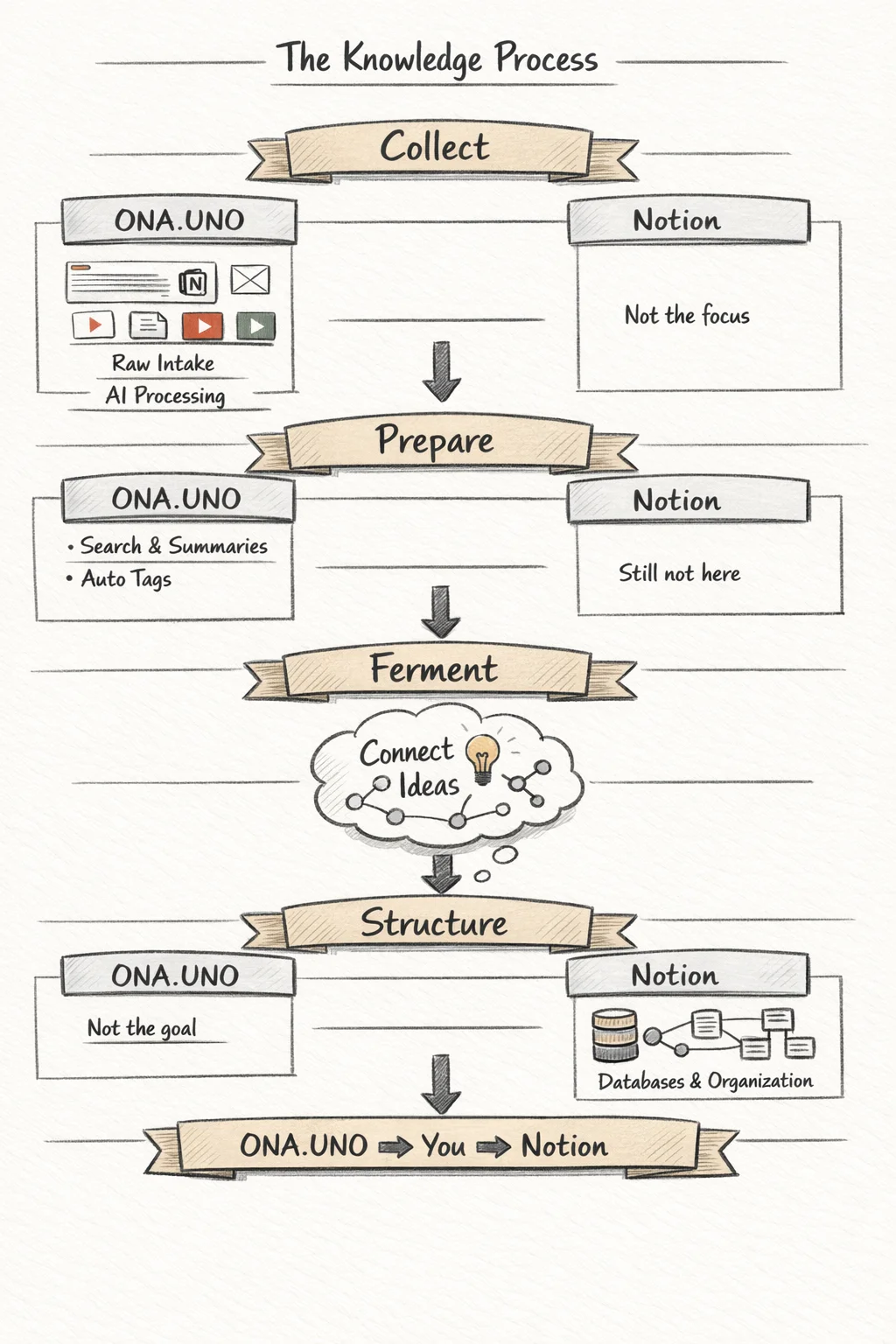
Notion is phenomenal for curated knowledge. But ninety percent of what you encounter never makes it into Notion, because every entry demands decisions. ONA.UNO catches the other ninety percent, the raw intake that arrives as emails, browser clips, PDFs, and screenshots. One collects, the other structures. They're not competitors. They're two phases of the same process.
I use Notion every day. I also built ONA.UNO. People see both and ask: why would I need ONA.UNO if I already have Notion?
Short answer: because Notion is terrible at the thing ONA.UNO does, and ONA.UNO doesn’t even try to do what Notion does. They’re different tools for different phases of the same process.
Where Notion is phenomenal
Notion is the best tool I know for curated knowledge. Databases with typed properties, relations between them, filtered views, rollups, formulas. Pages that evolve over months, accumulating structure as your thinking matures. When you know what you have and where it belongs, Notion lets you build a precise, maintainable architecture around it.
The key word is curated. Notion is at its best when every entry is a deliberate act. You create a page, you fill in the properties, you place it in the right database, you connect it to the right relations. That friction is the price of structure, and it’s worth paying.
Where Notion struggles
Now try dumping 500 browser clips into Notion. Or importing three years of emails. Or pointing it at your Obsidian vault, your Feedbin stars, a folder of PDFs, and a stack of YouTube videos you watched last quarter.
Notion wasn’t built for this. Every entry demands decisions: which database, what properties, what status, where in the hierarchy. For curated items, that’s a feature. For raw intake, it’s a wall. The result is that most of the material you encounter never makes it into Notion. You save the ten percent you’re sure about. The other ninety percent disappears.
That ninety percent is where the unexpected connections live. The article you half-read in February that turns out to be about the same structural argument as the email you got in January. The PDF you skimmed that suddenly matters three months later. You can’t curate what you haven’t recognized yet. You can only collect it and make it findable for later.
What ONA.UNO does instead
ONA.UNO is the intake layer. Everything flows in: browser clips, Apple Mail, Obsidian vaults, Feedbin RSS, PDF folders, screenshots, YouTube videos. You clip, connect, or point, and it appears in a single chronological timeline. No decisions about where it goes. No properties to fill in. No hierarchy to maintain.
Then the AI pipeline runs, automatically, in the background. Every item gets clean text extraction (including OCR for scans and transcripts for video), chunked embeddings for semantic search, a micro summary, an AI-generated title, and topic tags. Within seconds, your raw material is searchable and ready.
You can chat with your entire library, scoped to a day, a tag, or your current search results. Answers come with citations you can click to jump to the original source in Obsidian, Finder, Mail, or the web.
ONA.UNO is deliberately not editable. Items are sources as they were when you saved them, enriched but not altered. The value is in retrieval and synthesis, not in rewriting inside the tool. That’s Notion’s job.
The pipeline
Knowledge has phases.
Collect > Prepare > Ferment > Structure
ONA.UNO handles the first two. You throw everything at it, and the AI pipeline turns the raw dump into prepared material: searchable, summarized, tagged, semantically indexed. You did nothing except save.
The third phase is yours. Fermentation is you reading your summaries weeks later and realizing two unrelated articles are about the same pattern. Noticing that a note from January connects to something from March. No tool can do this. AI can surface what’s semantically close, but the judgment that something matters is human.
Notion handles the fourth. When you’ve decided what an insight is, where it belongs, and how it connects to everything else, Notion gives you the structure to make it durable. Databases, properties, relations, views.
Most tools try to cover all four phases and end up mediocre at each. The ones that work well are honest about which phase they’re built for.
Side by side
| ONA.UNO | Notion | |
|---|---|---|
| Purpose | Collect, prepare, retrieve | Structure, create, maintain |
| Content | Read-only (sources as saved, enriched by AI) | Fully editable (knowledge grows in place) |
| Best at | Bulk intake, raw material, everything you encounter | Curated knowledge, deliberate structure, long-lived pages |
| Import | Maximum: folders, Mail, Obsidian, Feedbin, browser clips, PDFs, screenshots, YouTube | Manual entry, CSV, some integrations |
| AI | Auto-summaries, auto-tags, auto-titles, embeddings, semantic search, chat with citations | Notion AI (summaries, search, writing assistance) |
| Organization | Automatic (AI pipeline). No manual structure needed | Manual (databases, properties, relations, views). Powerful but requires investment |
| Platform | Native macOS app | Web app, desktop wrapper, mobile |
| Pricing | One-time purchase. No subscription | Monthly/yearly subscription |
| Data | Local on your Mac. No ONA.UNO server. BYOK for AI (OpenRouter) | Cloud-hosted on Notion’s servers |
MCP connects them
Both ONA.UNO and Notion speak MCP (Model Context Protocol), the open standard that lets AI models interact with external tools through a live connection. An AI agent can read from ONA.UNO and write to Notion in the same conversation.
In practice: you’ve been collecting material for months in ONA.UNO. You open Claude and say: “Find everything I’ve saved about this topic, synthesize the key points, and create a structured entry in my Notion database with the right properties and tags.” The AI reads from one tool and writes to the other. No copy-paste, no tab-switching, no reformatting.
I wrote a separate post about what ONA.UNO’s MCP server makes possible and how it fits into the broader MCP landscape.
Use both
ONA.UNO is not a weaker Notion. Notion is not a replacement for ONA.UNO. They’re two phases of the same process, and the gap between them is where your thinking happens.
ONA.UNO collects and prepares. You ferment. Notion structures and preserves.