ONA.UNO Speaks MCP
Your emails, web clips, PDFs, and screenshots flow into ONA.UNO without effort. An AI pipeline turns all of it into a searchable knowledge base. Now, through MCP, an AI assistant like Claude can reach directly into that library, find the three items that matter across thousands, and write the result into Notion or wherever you think. This is what that looks like in practice.
You read an article. You click once. Full text, clean, in your library.
Your emails flow in from Apple Mail, automatically. You take a screenshot, it lands in your library, OCR’d, every word searchable. You save a PDF to a watched folder, it’s indexed and ready.
You watch a YouTube video. The transcript lands in your library, with timestamps, without you doing anything beyond watching.
Your Obsidian vault, your Feedbin stars, a folder of PDFs on your desktop. All of it flows in, continuously, silently. No dialogs, no property forms, no decisions about where things go.
Within seconds, every item has a clean title, a summary, topic tags, and semantic embeddings. You didn’t organize anything. You didn’t even think about organizing. You just lived your information life, and ONA.UNO turned all of it into a searchable, AI-ready knowledge base.
Now imagine an AI that can reach directly into that knowledge base. Search across tens of thousands of items. Pull the three that matter. Synthesize them. And write the result into your Notion database, your Obsidian vault, or wherever you do your structured thinking.
That’s what ONA.UNO’s MCP server makes possible. And that’s what this post is about.
What makes this possible
MCP stands for Model Context Protocol. Anthropic released it as an open standard in late 2024. The idea is simple: give AI models a structured way to talk to external tools. Not through copy-paste, not through file uploads, but through a live connection. The AI can read from your tools, search them, and write back.
Think of MCP as a universal socket. On one side, an AI model. On the other, any application that implements the protocol. The model doesn’t need to know how Notion stores its databases, or how Obsidian organizes its vault. It just calls the MCP server, and the server translates.
The PKM world has noticed. Notion runs an official hosted MCP server. Obsidian has several community-built servers that connect vaults to Claude and other agents. Tana exposes its workspace through a local MCP server built into its desktop app. Heptabase offers an official MCP server for searching whiteboards and note cards. Capacities has a community server. More are coming.
This is not a feature race. It’s a category shift. The tools that speak MCP become part of your AI workflow. The ones that don’t become islands.
ONA.UNO speaks MCP
ONA.UNO ships with a built-in MCP server. When you connect it to Claude (or any MCP-compatible client), the AI gains direct access to your entire knowledge base.
Four tools, each doing one thing well.
Search. The AI can search your ONA.UNO library by keyword, across titles, summaries, or full content. It can also run semantic searches, finding items that are conceptually related even when the words don’t match. “Find my notes about delivery timelines” returns the item you titled “Q3 project schedule.”
Get item. Once the AI finds something, it can read the full content, the summary, the tags, the source URL, the timestamps. Everything ONA.UNO knows about that item, the AI knows too.
List recent items. The AI can ask: what came in today? This week? It can browse your timeline the way you would, seeing what’s fresh.
List sources. ONA.UNO pulls from many places: browser clips, Apple Mail, Obsidian vaults, Feedbin RSS, PDF folders. The AI can see which sources are active and scope its searches accordingly.
That’s it. No configuration screens, no API keys to manage beyond your initial setup, no permissions to toggle per conversation. The server runs locally on your Mac, alongside the app. Your data never passes through an ONA.UNO server because there isn’t one.
What this looks like in practice
I clip an article from the NZZ. One click, full text, clean extraction. ONA.UNO processes it in the background: summary, tags, embeddings. No dialog, no database picker, no property form.
A minute later I’m in Claude. I paste the ONA.UNO link and say: “Read this. Now find related items from the last three months.”
Claude calls the MCP server, fetches the article, runs a search, and returns a list of connected sources I’d half-forgotten. An email that arrived through Apple Mail in January. A PDF from a report I’d dropped into a watched folder in February. A browser clip from a completely different publication that turns out to be about the same structural argument.
None of these required manual entry. The email landed automatically from Apple Mail. The PDF was picked up from a watched folder. The browser clip was one click. There’s even a screenshot I took in March, OCR’d and fully searchable without me doing anything beyond the key combination. ONA.UNO processed all of them, and now, months later, the AI finds the connection across 15,000 items in seconds.
Then I say: “Synthesize these into a structured entry in my Notion database, with the right tags and a summary.”
Claude reads from ONA.UNO. It writes to Notion. Both through MCP. I made one decision: this matters, connect it. The rest was execution.
This only works because the material was already there. Not ten carefully curated items. Thousands of items that flowed in with minimal effort over months, each one processed and indexed automatically. The MCP server is powerful, but it’s only as useful as the knowledge base behind it. And that knowledge base is only as large as your intake allows. ONA.UNO makes intake effortless, and that’s what makes the MCP connection transformative rather than decorative.
The architecture behind it
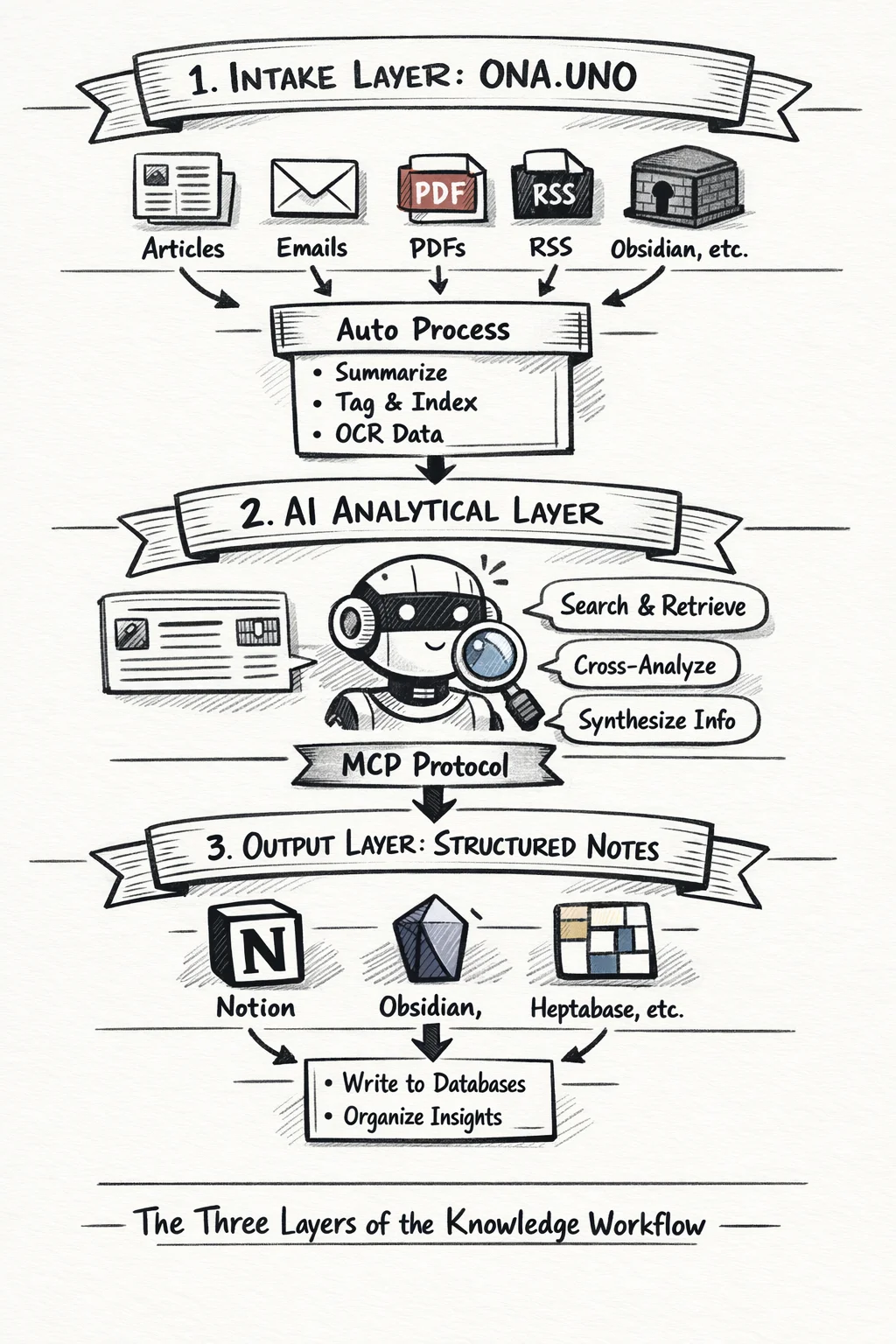
In a previous post, I described the knowledge pipeline as four phases: collect, prepare, ferment, structure. ONA.UNO handles the first two. You handle the third. A tool like Notion handles the fourth.
MCP is what connects these phases into a single workflow.
ONA.UNO is the intake layer. Everything flows in: articles, web clips, emails, PDFs, RSS, notes from Obsidian. The AI pipeline processes it automatically. Summaries, tags, titles, embeddings. Within seconds your raw material is searchable and ready.
The AI is the analytical layer. Through MCP, it can reach into ONA.UNO and pull exactly what it needs. It can cross-reference, synthesize, compare. It does the work that used to mean twenty browser tabs and an hour of manual searching.
Notion (or Obsidian, or Heptabase, or whatever you use for structured output) is the crystallization layer. This is where insights become durable: databases with properties, relations, views. The AI writes there too, through MCP.
The three layers are deliberately separate. ONA.UNO doesn’t try to be Notion. Notion doesn’t try to be a bulk collector. The AI doesn’t try to replace your judgment about what matters. Each layer does what it’s good at. MCP is the connective tissue.
This is what I designed ONA.UNO for. Not another note-taking app. Not another bookmark manager. The intake layer of a knowledge architecture that extends through AI into whatever output tools you already use. Local, private, yours. And now, through MCP, open to any AI that speaks the protocol.